Master Your Ideas: The Ultimate Guide to Building an Effective Idea Inbox

Do you ever have those moments when a brilliant idea strikes, only to vanish into thin air minutes later? A groundbreaking solution to a problem, a creative spark for a new project, a witty retort you wish you’d remembered – our minds are constantly buzzing with potential. However, without a reliable system, these valuable insights often slip away, lost to the relentless pace of daily life. The good news is that there’s a simple, yet incredibly powerful, solution: creating an effective idea inbox system.
In today’s fast-paced world, information overload is a constant. We’re bombarded with stimuli, and while this can be a source of inspiration, it can also lead to mental clutter and the tragic loss of potentially transformative ideas. An idea inbox system is your personal sanctuary for thoughts, a dedicated space where every fleeting notion, every sudden inspiration, and every potential solution can be safely stored and retrieved when needed. Think of it as a digital or physical net designed to catch all those valuable fish before they swim away.
This comprehensive guide will walk you through the process of establishing and maintaining a robust idea inbox system. We’ll cover everything from the philosophy behind it to practical tools and strategies, ensuring you never lose a good thought again. Whether you’re an entrepreneur, a creative professional, a student, or simply someone who wants to harness their full cognitive potential, mastering an idea inbox system is a game-changer for productivity, innovation, and personal growth.
Understanding the ‘Idea Inbox’ Concept
Before diving into the ‘how-to’, let’s clarify what an idea inbox system truly is. At its core, it’s a designated, easily accessible place where you can quickly deposit any thought, idea, task, or information that comes to mind, without judgment or immediate action. It’s the first stop for anything that needs to be remembered, processed, or acted upon later.
Why is an Idea Inbox Essential?
- Prevents Loss of Ideas: Our short-term memory is notoriously fickle. An idea inbox acts as an external hard drive for your brain, preserving thoughts that would otherwise be forgotten.
- Reduces Mental Clutter: By offloading thoughts from your mind into a trusted system, you free up cognitive resources, allowing you to focus on the task at hand without the nagging fear of forgetting something important. This is a core principle of systems like Getting Things Done (GTD).
- Fosters Creativity: Knowing you have a reliable place to store ideas encourages more creative thinking. You’re less hesitant to explore unconventional thoughts when you know they won’t be lost.
- Enables Future Development: Raw ideas are rarely fully formed. An inbox allows you to capture them in their nascent stage, giving them a chance to mature and develop over time.
- Boosts Productivity: By centralizing your ideas, you can easily review, prioritize, and integrate them into your projects and goals, leading to more efficient execution.
The beauty of an idea inbox system lies in its simplicity and flexibility. It’s not about complex software or rigid rules; it’s about creating a habit of capturing, processing, and organizing your intellectual assets.
Phase 1: Capturing Ideas – The Foundation of Your Idea Inbox System
The first and most crucial step in building an effective idea inbox system is establishing reliable capture mechanisms. An idea is only valuable if it can be recorded. The key here is speed and accessibility. You need tools that are always within reach, allowing you to jot down a thought in seconds, no matter where you are or what you’re doing.
Digital Tools for Rapid Capture
In the digital age, a plethora of tools can serve as your primary capture points. The best choice depends on your personal preferences and existing tech ecosystem.
- Smartphone Note Apps: Almost everyone carries a smartphone. Apps like Apple Notes, Google Keep, Evernote, or Simplenote are excellent for quick text notes, voice memos, or even photos of whiteboards. You can literally capture an idea while walking, waiting in line, or even in the middle of a conversation (discreetly, of course!).
- Voice Recorders: Sometimes typing isn’t feasible. A dedicated voice recorder app or your phone’s built-in voice memo function can be a lifesaver for capturing ideas while driving, exercising, or when your hands are otherwise occupied.
- Email Yoursefl: A simple, often overlooked method. Send a quick email to your own inbox with a subject line that clearly states the idea. This is especially useful if you’re already in your email client.
- Browser Extensions: For web-based ideas, extensions like ‘Save to Pocket’ or ‘Evernote Web Clipper’ allow you to save articles, links, or snippets of text directly to your inbox with a single click.
- Dedicated Inbox Apps: Some productivity apps, like Todoist or Things, offer a quick-add feature that functions perfectly as an idea inbox. Thoughts can be entered as tasks or notes and then processed later.
Physical Tools for Analog Capture
Despite the digital revolution, physical tools still hold immense power for capturing ideas, especially for those who prefer a tactile experience or want to minimize screen time.
- Notebook and Pen: The classic. Always carry a small notebook or a few index cards and a pen. The act of writing can sometimes even aid in crystallizing thoughts.
- Sticky Notes: Great for temporary ideas or reminders that need to be visible. Just remember to transfer them to your main idea inbox system during your processing phase.
- Whiteboards/Glass Boards: Excellent for brainstorming sessions or when you need a large canvas to visually connect ideas. Snap a photo of the board when you’re done to digitize the ideas.

Best Practices for Capturing
- Make it Frictionless: The easier it is to capture an idea, the more likely you are to do it. Minimize steps and cognitive load.
- Don’t Edit, Just Capture: Your inbox is for raw input. Don’t worry about grammar, spelling, or completeness. Just get the essence down.
- Be Specific Enough: While you shouldn’t edit, ensure you capture enough context so that when you review it later, you understand what the idea was about. A single word might not be enough.
- Consolidate Regularly: While you might use multiple capture tools (e.g., phone notes, physical notebook), ensure you have a routine for consolidating all these inputs into your primary idea inbox system.
Phase 2: Processing Your Idea Inbox – Turning Raw Input into Action
Capturing ideas is only half the battle. The real magic happens during the processing phase. This is where you take the raw, unrefined thoughts from your inbox and decide what they are, what they mean, and what, if anything, needs to be done with them. This process should be done regularly and systematically.
The ‘Empty Your Inbox’ Principle
Inspired by workflow methodologies like GTD, the goal is to regularly ’empty’ your idea inbox system. This doesn’t mean deleting everything, but rather ensuring each item has been reviewed and assigned a next step or destination. Treat your inbox like a physical mail inbox – you open each piece, decide what it is, and then move it to its appropriate place.
A Step-by-Step Processing Workflow
- Set Aside Dedicated Time: Schedule a regular slot for processing your inbox. This could be daily for 15 minutes, or a longer session once or twice a week. Consistency is key.
- Go Through Each Item: Start from the top and process one item at a time. Do not skip items or jump around.
- Ask Key Questions: For each item in your idea inbox system, ask yourself:
- What is it? (Is it an idea, a task, a piece of information, a project?)
- Is it actionable? (Does it require me to do something?)
- If yes, what’s the very next action? (Be specific: ‘Research X’, ‘Call Y’, ‘Draft Z’)
- If no, is it reference material? (Something to keep for future use, like an article or a concept.)
- If no, is it an idea for later? (Something to incubate or brainstorm further, but not immediately actionable.)
- Can I do it in less than two minutes? (If yes, do it immediately! This is the ‘two-minute rule‘ and it’s a powerful productivity hack.)
- Decide on a Destination: Based on your answers, move the item to its appropriate place:
- Task List: If it’s an actionable item, move it to your task manager (e.g., Todoist, Asana, physical planner).
- Calendar: If it’s a specific appointment or time-bound event, add it to your calendar.
- Project List: If it’s a larger project composed of multiple tasks, add it to your project management tool.
- Reference System: If it’s information you need to keep, file it in your digital filing system (e.g., Evernote, Notion, cloud storage) or physical archive.
- Incubator/Brainstorming List: If it’s a raw idea that needs more thought but isn’t immediately actionable, move it to a dedicated ‘Ideas for Later’ or ‘Brainstorming’ list. This is a crucial distinction for a sophisticated idea inbox system.
- Trash: If it’s no longer relevant or useful, delete it without remorse.
The key here is that nothing stays in the inbox. Every item is processed and moved out, ensuring your inbox remains a clear, temporary holding area, ready for new inputs.
Phase 3: Organizing and Developing Ideas – The Power of Your Idea Inbox System
Once you’ve captured and processed your ideas, the next step is to organize them in a way that facilitates their development and eventual implementation. This is where your idea inbox system truly shines, transforming raw thoughts into tangible projects and innovations.
Structuring Your Idea Repository
Where do those ‘Ideas for Later’ go? You need a dedicated space for them. This could be:
- Dedicated Notebook/Section: For analog users, a specific notebook or a section within a larger one.
- Digital Notebook/App: Tools like Notion, Obsidian, Roam Research, or even specialized sections within Evernote or OneNote are excellent for this. They allow for tagging, linking, and rich text formatting.
- Mind Mapping Software: For visual thinkers, mind maps (e.g., XMind, MindMeister) can be a great way to link related ideas and explore concepts.
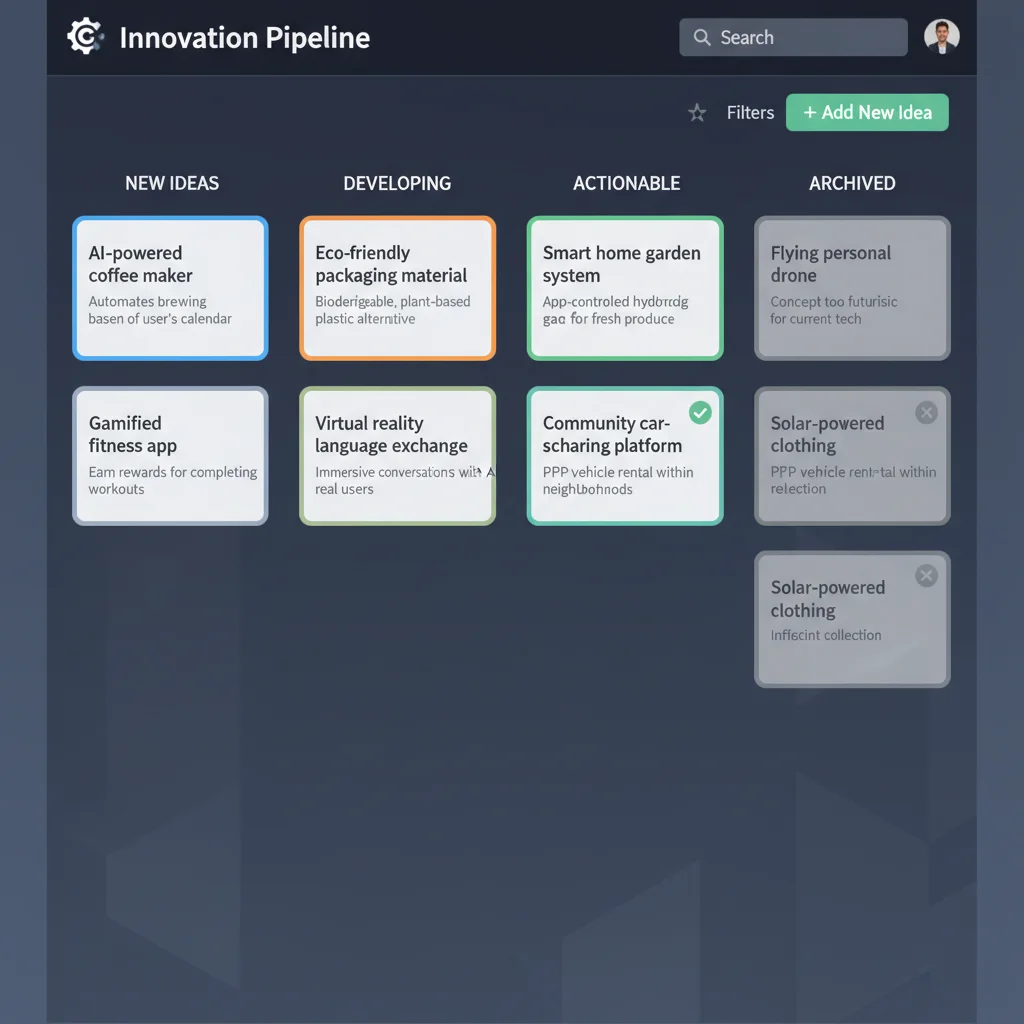
- Kanban Boards: Tools like Trello or Asana can be adapted to manage ideas through different stages: ‘New Ideas’, ‘Brainstorming’, ‘Developing’, ‘Ready for Action’.
Strategies for Idea Development
- Tagging and Categorization: Assign relevant tags (e.g., #marketing, #personal-project, #blog-post, #innovation) to your ideas. This makes them easily discoverable when you’re looking for inspiration in a specific area.
- Regular Review: Periodically review your ‘Ideas for Later’ list. Some ideas might suddenly become relevant, while others might need to be discarded. This keeps your repository fresh and prevents it from becoming a graveyard of forgotten thoughts.
- Incubation: Allow ideas to ‘stew’. Sometimes, an idea needs time to marinate in your subconscious before it’s ready to be acted upon. Don’t force development; let it happen naturally.
- Connect the Dots: Look for connections between seemingly disparate ideas. Sometimes, combining two or more small ideas can lead to a breakthrough. This is where a well-organized idea inbox system with good tagging really pays off.
- Brainstorming Sessions: When an idea seems promising, dedicate time to expanding on it. Use techniques like free writing, mind mapping, or the SCAMPER method (Substitute, Combine, Adapt, Modify, Put to another use, Eliminate, Reverse) to flesh out the concept.
- Prototype/Test Small: For actionable ideas, consider how you can test them on a small scale. What’s the minimum viable product or experiment?
Your idea inbox system should be a living, breathing entity, not a static archive. It should inspire action and fuel your creative process.
Choosing the Right Tools for Your Idea Inbox System
The best tools for your idea inbox system are the ones you’ll actually use consistently. There’s no one-size-fits-all solution, so experiment and find what resonates with you.
Popular Digital Idea Inbox Tools
- Evernote: A classic for a reason. Great for notes, web clips, images, and audio. Powerful search and tagging. Can be a bit feature-heavy for some.
- OneNote: Microsoft’s answer to Evernote, often preferred by those in the Microsoft ecosystem. Free, highly flexible notebook structure, excellent for free-form notes and drawings.
- Google Keep: Simple, fast, and integrates seamlessly with other Google services. Perfect for quick notes and checklists, though less robust for long-form content.
- Notion: A highly versatile workspace that can be customized to be anything from a simple note-taker to a complex project manager. Excellent for building interconnected knowledge bases and idea dashboards.
- Obsidian: A powerful knowledge base on top of a local folder of Markdown files. Ideal for those who want full control over their data and love linking ideas together (a ‘second brain’ approach).
- Apple Notes: Simple, effective, and built into the Apple ecosystem. Great for quick captures and basic organization.
- Todoist/Things 3: While primarily task managers, their quick-add features make them excellent front-ends for an idea inbox system, allowing you to capture quickly and then process into tasks or projects.
Analog Tools
- Field Notes/Moleskine/Leuchtturm1917: High-quality notebooks that make the act of writing a pleasure.
- Index Cards: Excellent for capturing single ideas that can then be sorted, shuffled, and organized.
- Bullet Journal: A flexible analog system that can incorporate an idea inbox, task lists, and future planning.
Hybrid Approaches
Many successful systems combine digital and analog. You might capture quick thoughts on paper throughout the day and then digitize them during your processing session. Or you might use a digital tool for organization but a physical whiteboard for brainstorming. The key is integration and consistency.
Maintaining Your Idea Inbox System: Consistency is Key
A brilliant idea inbox system is only as good as its maintenance. Without consistent usage and review, it quickly devolves into a digital junkyard, defeating its purpose.
Establish a Routine
- Daily Capture Habit: Make it a habit to capture every idea, no matter how small or seemingly insignificant. The more you practice, the more natural it becomes.
- Regular Processing Sessions: As mentioned, schedule dedicated time to process your inbox. This might be 15 minutes each morning, or a longer session on a Friday afternoon. Find what works for your schedule.
- Weekly Review: Implement a weekly review where you look at your entire idea inbox system: your capture tools, your main inbox, your ‘Ideas for Later’ list, and your project lists. This helps you stay on top of things, identify forgotten gems, and ensure everything is still relevant.
Refine and Adapt
- Your System Will Evolve: What works today might not work perfectly six months from now. Be open to refining your tools and processes as your needs change.
- Don’t Be Afraid to Experiment: Try different apps, different organizational structures, or different review frequencies. The goal is to find a system that supports your unique way of thinking and working.
- Keep It Simple: Avoid over-engineering. The more complex your system, the less likely you are to use it consistently. Start simple and add complexity only when necessary.
Common Pitfalls and How to Avoid Them
Even the best idea inbox system can fall apart if you’re not aware of common challenges.
- The ‘Black Hole’ Inbox: This happens when you capture ideas but never process them. Your inbox becomes a bottomless pit of forgotten thoughts. Solution: Commit to regular processing sessions.
- Over-Complication: Using too many tools or having an overly complex tagging/folder structure can lead to decision fatigue and abandonment. Solution: Start simple, add complexity only when a clear need arises.
- Lack of Trust: If you don’t trust that your system will hold your ideas safely, you’ll revert to trying to remember everything, leading to mental clutter. Solution: Consistently use and review your system until it becomes a reliable second brain.
- Perfectionism in Capture: Trying to write perfect, fully-formed notes during capture. Solution: Remember the goal is rapid, frictionless capture. Edit and refine during processing.
- Analysis Paralysis: Spending too much time organizing and categorizing instead of developing or acting on ideas. Solution: Focus on getting ideas out of the inbox, and then prioritize development during dedicated work sessions.
The Future of Your Ideas: From Inbox to Innovation
Imagine a future where no brilliant thought is ever lost, where every creative spark has the opportunity to ignite something new. That’s the promise of a well-implemented idea inbox system. It’s more than just a productivity hack; it’s a foundational practice for anyone looking to cultivate a more creative, organized, and impactful life.
By consistently capturing, processing, and organizing your ideas, you’re not just managing information; you’re building a personal knowledge base, a reservoir of potential innovations, and a testament to your own intellectual journey. This system empowers you to:
- Identify opportunities: Spot patterns and connections you might otherwise miss.
- Solve problems more effectively: Draw upon a rich history of thoughts and potential solutions.
- Fuel personal and professional growth: Continuously learn, adapt, and create.
- Reduce stress and mental load: Free your mind from the burden of remembering everything.
Start small. Choose one capture tool, commit to a daily processing habit, and watch as your ability to harness your ideas transforms. Your future self, brimming with well-developed projects and insightful solutions, will thank you for investing in a robust idea inbox system today.
Remember, the goal isn’t to be perfect, but to be consistent. Embrace the iterative nature of building a system, and celebrate every idea you save from oblivion. Your next big breakthrough might just be waiting in your inbox.